Solar Power for Camping: Build a Setup Around Your Trip
Plan camping battery capacity, compare two portable stations, and choose compatible solar panels around cooler demand, carrying weight, and charging access.
Featured Options Compared in This Guide
Full specs & notes ↓For a short camping trip, start with enough charged battery capacity to cover the stay if practical. Solar becomes more useful when a powered cooler or a longer trip creates a daily need to recharge. For a hike with only a phone and headlamp, compare a charged power bank with the combined weight of a panel, battery, and cables before adding solar.
Build the setup around the energy you need between dependable charging opportunities. Treat sunshine as a variable in the plan, especially when refrigeration depends on it.
Match the setup to the trip
| Trip | Practical starting point | Decision that matters most |
|---|---|---|
| Overnight hike with a phone and headlamp | Charged USB power bank | Can it cover the trip with a reserve at an acceptable carrying weight? |
| Two-night car camp with lights and devices | Power bank or small station sized for the stay | Would charging at home remove the need to carry panels? |
| Several days with a powered cooler | Battery for overnight use and a chosen cloudy-weather reserve, plus compatible panels | Can daily charging replace the cooler and electronics consumption? |
| Longer vehicle trip with work equipment | Storage sized around refrigeration and work, with planned charging stops | How much energy can each stop or day at camp realistically replace? |
Choose the campsite and panel arrangement together. A wooded site may suit sleeping but leave little room for solar collection. Before relying on panels, identify where you can place them and whether you will be at camp to reposition or pack them away.
Budget a light-use weekend
The following is a hypothetical planning example, not measured consumption or a claim about particular equipment:
| Load | Assumed daily energy |
|---|---|
| Phone charging, all phones combined | 40Wh |
| Lights: 5W combined for four hours | 20Wh |
| Fan: 10W for six hours | 60Wh |
| Camera and other small electronics | 30Wh |
| Total | 150Wh |
Two full days require 300Wh in this example. If you provisionally budget only 80% of nominal battery capacity for device use, allowing the rest for losses and reserve, the calculation is 300Wh ÷ 0.80 = 375Wh nominal capacity. That 80% is an assumption to replace with your own setup’s results, not a stated efficiency for either station below. Count the full time away; two nights may include most of three days.
For this light load, carrying enough charged storage may be simpler than setting out panels. Add laptop charging, cooking appliances, or other equipment separately before deciding.
Also match the outputs to the equipment. For USB charging, compare the device’s charging requirements with the source and cable specifications, then rehearse with that combination. USB-IF explains that USB Power Delivery supports different power levels and defines cable requirements; the standard’s maximum capability does not establish what an individual charger supplies.
Let the cooler determine the larger budget
Before buying a larger station, run the cooler for a full day at the temperature you intend to use, under conditions reasonably representative of the trip. Record energy consumption and the conditions. Dometic’s cooler comparison calculates compressor consumption using current draw and the proportion of time running. That supports using energy over time rather than treating compressor running power as constant all day. Its example is specific to the cooler and assumptions shown.
Suppose your planning allowance is 600Wh/day for the cooler, plus the 150Wh/day above. These remain hypothetical inputs. Together they require 750Wh/day, or 1,500Wh over two full days without charging.
Now consider a hypothetical 200W panel:
200W × 4 equivalent full-sun hours × 0.75 assumed charging factor = 600Wh/day.
Equivalent full-sun hours represent an energy allowance, not simply hours between sunrise and sunset. The 0.75 factor is also an assumption, not a measured result. With these inputs, charging falls 150Wh short of daily consumption. At two equivalent sun hours, collection falls to 300Wh and the shortfall grows to 450Wh.
Under the same assumptions, a 400W panel would yield 1,200Wh at four equivalent sun hours, but only 600Wh at two. That makes a larger compatible panel worth considering for longer stays, while showing why it cannot replace a cloudy-weather reserve. A larger battery covers a shortfall for longer; it does not eliminate a recurring daily deficit.
Keep food temperature separate from energy-saving choices. FDA guidance recommends a refrigerator temperature no higher than 40°F and using an appliance thermometer. Pack an ice-cooler backup or plan meals that do not depend on refrigeration if charging falls short.
Two stations with different carrying costs
The EcoFlow DELTA 3 specification table lists 1,024Wh capacity, 1,800W total AC output, and approximately 27.6 lb weight. Its car-style output is listed at 12.6V, 10A, and 126W maximum; compare that specific port with a cooler’s requirements if you intend to use it.
Applying the example’s 80% planning allowance gives about 819Wh for devices. That only just exceeds one 750Wh day and falls short of the 1,500Wh two-day budget. The DELTA 3 is therefore a candidate when carrying weight matters and the trip includes dependable charging, or when actual demand is lower.
Jackery’s Explorer 2000 Plus support page lists 2,042.8Wh capacity and 3,000W total AC output for model JE-2000C. Its listed weight is approximately 27.9kg, equivalent to approximately 61.5 lb. Jackery lists its car-style output at 12V/10A.
At the same assumed 80% allowance, the Jackery provides about 1,634Wh for the example budget—slightly above two full days at 750Wh/day. That is planning arithmetic, not a runtime guarantee. It offers roughly twice the nominal storage of the DELTA 3, with more than twice the station weight. For a vehicle camp near the parking spot, that may be a worthwhile trade; for repeated carries to a distant pitch, weight deserves more attention.
For the 300Wh light-use weekend, both provide substantially more nominal storage than the example requires. Neither needs to be the default purchase. Compare the complete cost and carrying load of the station, panels, adapters, and other accessories.
Choose panels around the charging inputs
For the DELTA 3, EcoFlow lists a solar-input range of 11–60V and a 500W maximum. Those are separate constraints: panel wattage alone does not establish compatibility. Have the proposed panel arrangement checked against the station’s complete connection requirements before buying. The product page offers both standalone and panel-bundle selections, so select the package deliberately. Source: EcoFlow.
The hypothetical 400W calculation above makes that size worth evaluating for the 750Wh/day camp budget, but it does not establish compatibility for an unspecified 400W panel. Nor does a 500W input ceiling promise 500W throughout the day.
For the Explorer 2000 Plus, Jackery lists solar input at 17.5–60V, with a single-port limit of 12A and 700W, and dual-port limits of 24A and 1,400W. Its two DC inputs are connected in parallel and have specific panel-matching rules. In particular, a 100W panel on one input and a 200W panel on the other is not supported. Source: Jackery support.
For the SolarSaga configurations described in that support table:
- One or two panels use the included cable without an additional series adapter purchase.
- Three panels require one SolarSaga Adapter for the Pro/Plus/New series, combining the panels into one input.
- Four or six panels require two adapters, split equally between inputs as two plus two or three plus three.
Jackery requires the panels on an adapter to match in model and output. Its guidance also describes a limited exception for mixing models with identical maximum wattage, open-circuit voltage, and operating voltage. For an uncomplicated purchase, plan matching panels and the stated adapters rather than assuming an existing panel can be added later. Follow the panel-specific connector instructions in the same support table.
Place panels and schedule charging
EIA explains that panel orientation and tilt affect solar output, with panels capturing more energy when directed toward the sun. At camp, use the panel’s supports and instructions, choose a position clear of shadows, and recheck its position as the sun moves. Avoid treating one fixed angle as the answer for every trip.
Plan a dry, ventilated location for the station and route cables away from walking routes. Jackery states that the Explorer 2000 Plus does not support waterproof or dustproof protection. EcoFlow’s listed IP65 rating applies specifically to the DELTA 3’s battery pack; do not extend that claim to every port or connection. Jackery support; EcoFlow specifications.
Charge before departure and identify permitted electrical charging stops. For vehicle charging, establish compatibility using the vehicle and station instructions, then measure what your actual driving schedule replaces before counting it in the trip budget.
For the Jackery, ordinary car-port charging is manufacturer-listed at approximately 25 hours, so a short drive should not be your plan for a full refill. It also does not support simultaneous solar and car charging, or two car-charging cables at once. Schedule solar at camp and car charging separately. Jackery does support simultaneous wall and solar charging; EcoFlow also lists AC-plus-solar charging for the DELTA 3. Jackery charging guidance; EcoFlow charging options.
If a portable generator supplies charging power, use it outdoors, away from openings where exhaust could enter occupied spaces. The FDA warns against gasoline engines in enclosed structures and against positioning engines where exhaust can enter through open doors or windows.
For medical equipment, make a separate backup-power plan. The same FDA page advises consulting the device instructions, manufacturer, or distributor about battery or generator operation. A station’s capacity alone does not establish medical-device compatibility.
Before a remote trip, rehearse the complete setup at home, including overnight cooler use and the cables you will pack. Record consumption and charging, and confirm that output settings keep necessary equipment powered. For a permanent vehicle installation, see the RV solar setup guide.
Shopping option: search Amazon for the EcoFlow DELTA 3. This is an affiliate search link; GreenChoice may earn a commission from qualifying purchases. Confirm the exact model and package contents before ordering.
Sources
- EcoFlow DELTA 3 specifications and charging options
- Jackery Explorer 2000 Plus specifications, panel rules, and charging guidance
- Dometic: calculating cooler energy consumption
- USB-IF: USB Power Delivery
- EIA: solar output, orientation, and tilt
- FDA: food temperatures and outage preparation
- FDA: medical-device power planning and engine-exhaust precautions
Products Compared in This Guide
The EcoFlow DELTA 3
Compare current manufacturer specifications, materials, and package options for The EcoFlow DELTA 3.
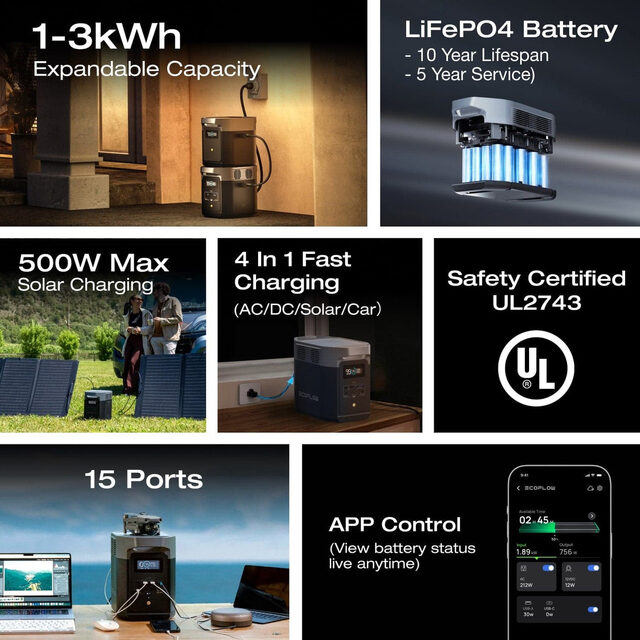
EcoFlow Delta 2 + 220W Bifacial Panel
The ideal car camping solar kit. The Delta 2 handles a 12V compressor cooler, all device charging, LED string lights, and a fan simultaneously. The 220W bifacial panel recharges the station during the day. Together they provide essentially indefinite power on summer days.
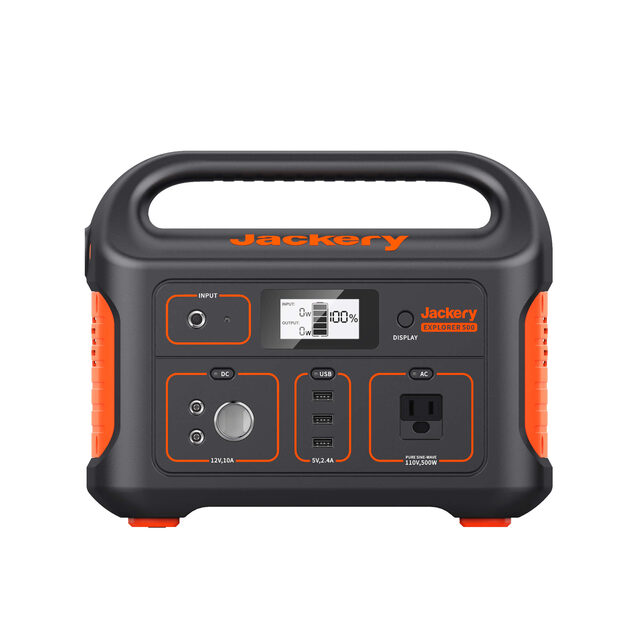
Jackery Explorer 500
The right first power station for solo or couple camping. 518Wh, 500W output, 14.8 lbs. Handles device charging, LED lights, and a small fan. Can't run a 12V compressor cooler continuously, but covers all personal devices and lighting easily.
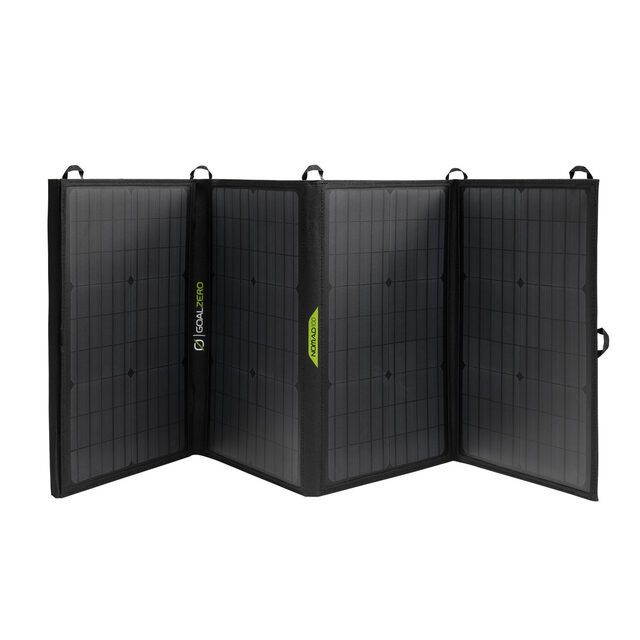
Goal Zero Nomad 100 Solar Panel
Goal Zero's mid-range portable panel. 100W, 20.1% efficiency, USB-A and 8mm barrel output. Pairs natively with any Goal Zero Yeti station. Solid build quality. Overpriced compared to EcoFlow 220W or Renogy equivalents, but the best choice for Goal Zero ecosystem users.